Introduction
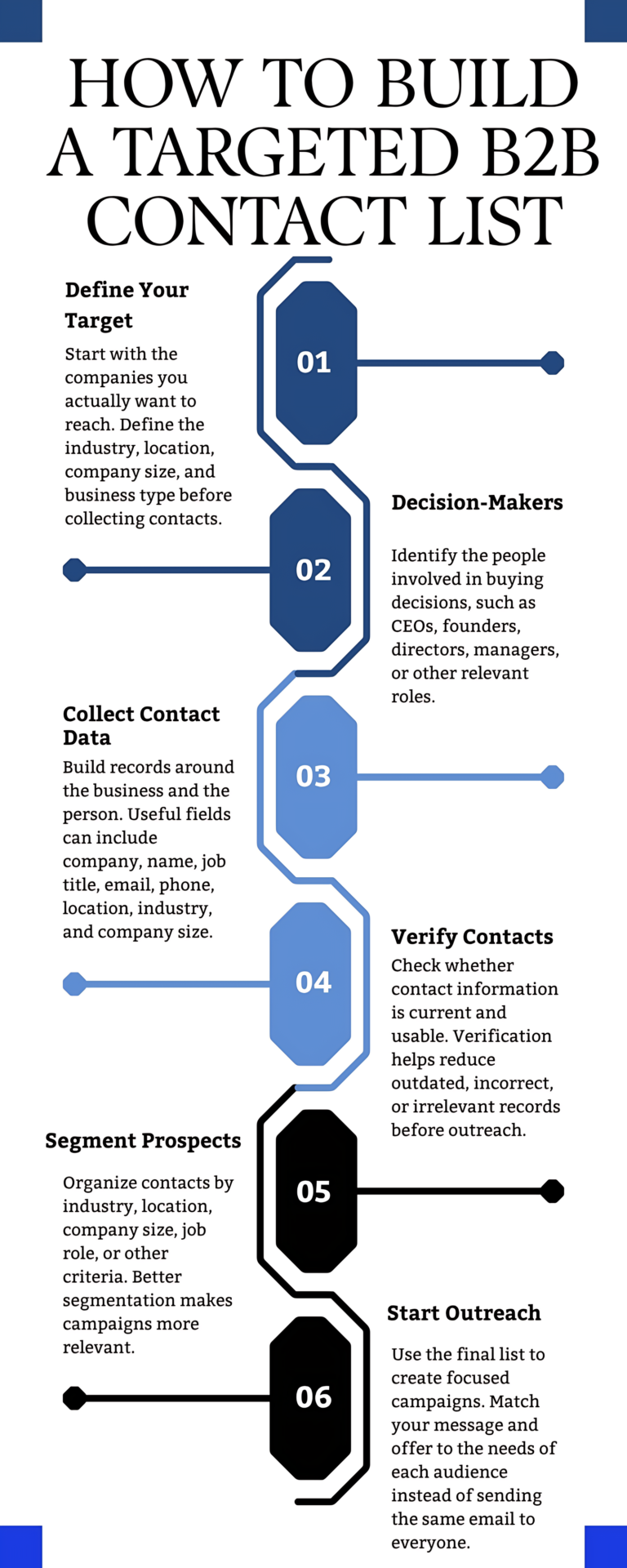
A targeted B2B contact list is a set of business contacts chosen because they match the companies and job roles you actually want to sell to. You can build one in six steps: define your target, identify decision-makers, collect contact data, verify contacts, segment prospects, and start outreach. This infographic walks you through each step, so your list stays focused, and your campaigns reach people who are likely to care about your offer.
6 Steps to Build a Targeted B2B Contact List
1. Define Your Target
Before you collect a single contact, decide which companies you actually want to reach. A clear target stops you from filling the list with businesses that will never buy, which wastes both time and budget. Describe your target companies using four criteria:
- Industry: the sector they work in, such as manufacturing or healthcare
- Location: the countries, regions, or cities you serve
- Company size: usually measured by employee count or annual revenue
Business type: for example, a manufacturer, agency, distributor, or retailer
Many teams write these criteria down as an ideal customer profile (ICP), which then guides every later step.
2. Identify Decision-Makers
Once you know which companies fit, work out who inside those companies takes part in buying decisions. In B2B sales, a purchase often involves more than one person, so a single contact per company may not be enough. Relevant roles can include:
- CEOs and founders
- Directors
- Managers
- Other roles that influence or approve the purchase
Choose roles based on what you sell. If you offer payroll software, for instance, finance and HR leaders matter more than the head of sales. When your offer is aimed at top leadership, a C-Level Executives Email List keeps the focus on the people who sign off on major purchases.
3. Collect Contact Data
Every record should describe two things: the business and the person who works there. Whether you gather contacts yourself or receive a B2B Email List from a list provider, check that each record includes the fields you’ll need later.
| Field | What It Tells You |
|---|---|
| Company | The organization the contact works for |
| Name | Who you're contacting |
| Job Title | Their role and likely part in the buying decision |
| Your main channel for outreach | |
| Phone | A second way to reach them |
| Location | Where the person or company is based |
| Industry | The company's sector |
| Company Size | How large the business is |
Fields such as industry, location, and company size do two jobs. They confirm that a contact fits your target, and they let you segment the list later. Keep in mind that a named business contact still counts as personal data in many countries. For example, the UK Information Commissioner’s Office (ICO) says UK GDPR applies to a person’s work email, even when that person is acting in a business capacity.
4. Verify Contacts
Contact data doesn’t stay accurate for long, because people change jobs, get promoted and move to new companies. Verification checks whether each record is still current and usable, which helps you remove outdated, incorrect, or irrelevant contacts before outreach. Before each campaign, confirm that:
- The email address is valid and still active
- The person still holds the listed job title at the listed company
- The phone number reaches the right person or office
- The company still matches the target you set in Step 1
Update or remove any record that fails these checks. If a large part of your file is out of date, Data Cleansing Services can correct or replace old records before you import them into your CRM.
5. Segment Prospects
A verified list is ready to use, although it works better once you split it into smaller groups. Segmentation means organizing contacts by shared traits, such as:
- Industry
- Location
- Company size
- Job role
- Other criteria that matter to your offer
For example, “IT directors at mid-sized manufacturing companies in Germany” is one segment. Because everyone in that group faces similar problems, you can write a message that speaks directly to them, which makes the campaign more relevant.
6. Start Outreach
Now use the final list to run focused campaigns. Match your message and offer to the needs of each segment instead of sending the same email to everyone. The founder of a 20-person agency and a director at a large manufacturer face different problems, so they should receive different emails.
Before you send, make sure your emails follow the law where your contacts are based. In the US, the Federal Trade Commission (FTC) says the CAN-SPAM Act makes no exception for business-to-business email. Each commercial email needs accurate sender details, an honest subject line, a valid postal address, and a clear way to opt out, and you must honor opt-out requests within 10 business days.
Frequently Asked Questions
What is a targeted B2B contact list?
It’s a list of business contacts selected because they work at companies that match your target profile and hold roles involved in buying decisions. Unlike a broad list, every contact on it has a clear reason to hear from you.
What fields should a B2B contact list include?
Useful fields include company, name, job title, email, phone, location, industry, and company size. The last three also help you segment the list before outreach.
Why should you verify B2B contacts before outreach?
Contact details go out of date as people change jobs and companies change. Verification removes outdated, incorrect, or irrelevant records, so your emails reach real people who still fit your target.
Does CAN-SPAM apply to B2B emails?
Yes. The FTC states that CAN-SPAM makes no exception for business-to-business email, so B2B campaigns sent to US contacts must include a valid postal address and a working opt-out. Rules differ in other countries, so check the laws where your contacts are based.