A B2B email address usually becomes invalid soon after verification for one of three reasons. The person left the company and IT closed the mailbox, the verifier never truly confirmed the mailbox in the first place, or the address is still fine, but your message was rejected for another reason and recorded as a bounce. Verification is a snapshot of one moment, not a promise about next month. The fix is to read the actual bounce message, separate dead addresses from false alarms, and re-check your riskiest contacts right before you send.
Here’s the short version:
- People leave jobs every month, and IT teams close their mailboxes once the person has left.
- “Catch-all” and “unknown” results often get counted as valid, although nobody confirmed that the mailbox exists.
- Some company domains change because of rebrands, mergers, or email system moves, which breaks every address on the old setup.
- Many “invalid” bounces are really blocks, full mailboxes, or temporary delays, so the address isn’t dead at all.
Which causes hit your list? A quick decision table
Before you remove anything, match what you’re seeing to the most likely cause.
| When You See This | What It Usually Means | How to Confirm | What to Do |
|---|---|---|---|
| "User unknown" bounces spread across many companies | People left, and their mailboxes were deleted | Bounce text shows a 5.1.1 code | Remove those addresses and don't retry them |
| Bounces only from addresses marked "catch-all" or "unknown" | The verifier couldn't confirm those mailboxes | Compare bounced addresses with your original verification report | Send to that segment in small batches, or leave it out |
| Many bounces from one company domain | The company changed its domain or email system | Check the company's website and recent news for a rebrand or merger | Find the new domain and pattern before sending again |
| Bounces with words like "blocked", "policy", or "spam" | Your message was rejected, not the address | Bounce text shows a 5.7.x code | Fix your sending setup and keep the contacts |
| "Mailbox full" or "try again later" | A temporary problem | Bounce text shows a 4.x.x code or "mailbox full" | Let your platform retry, then remove the address if it keeps failing |
What does "verified" actually mean?
Most people picture verification as sending a test email. It isn’t. A verifier connects to the company’s mail server and asks, in effect, “Would you accept mail for this address?” It then disconnects before sending anything. Whatever the server says at that moment becomes the result in your report.
This method has limits, and the email rules themselves allow them. RFC 5321, the IETF standard that defines how email is delivered, lets server owners switch off address-checking commands for security reasons. It also allows a server to accept a recipient during the conversation and report a failure later as a separate bounce message. So a “valid” result really means “the server said yes when we asked,” and nothing more.
Verifiers are open about this in their own documentation. NeverBounce’s help guide on result codes says an accept-all (catch-all) result “is a setting on the recipient’s mail server, not a verdict on the individual address.” It also explains that an “unknown” result means the server didn’t give a clear answer in time, often because of greylisting or a security gateway.

Five reasons a verified B2B address goes bad (or only looks bad)
1. The person left, and IT removed the mailbox
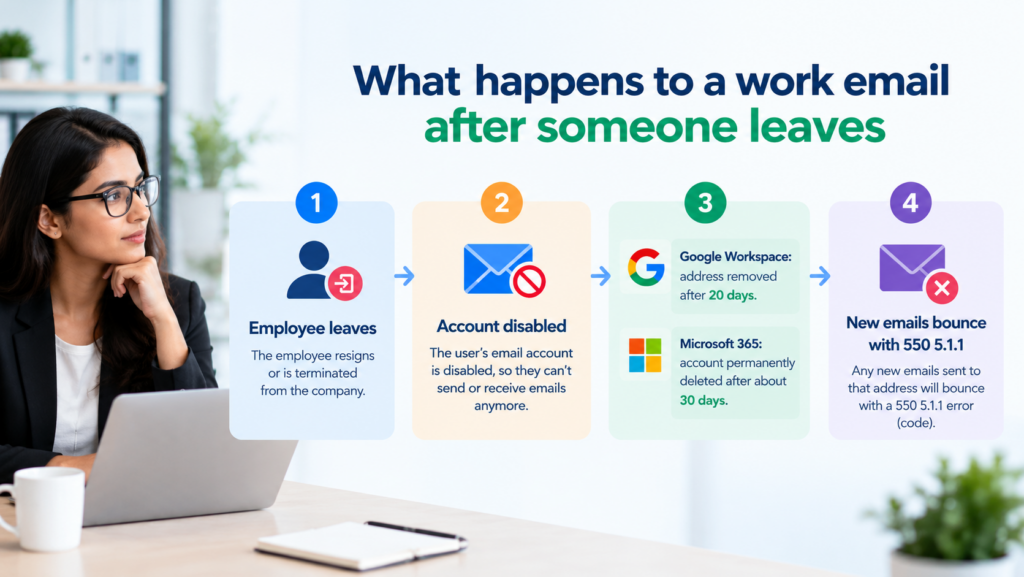
This is one of the most common causes. The US Bureau of Labor Statistics reported 5.1 million total job separations in August 2026 alone, which is a separations rate of 3.2% in a single month (JOLTS release, 29 September 2026). Not every person who left had a work email, but almost every contact in a B2B list does, so job changes hit B2B lists hard.
When someone leaves, their company’s IT team closes the account on a schedule. Microsoft’s admin guidance, last updated on 5 January 2026, says a deleted Microsoft 365 user stays inactive for about 30 days before permanent deletion. Google’s Workspace admin help says a deleted user’s address is removed from Google Workspace 20 days after deletion. That’s why an address can pass verification today and bounce three weeks from now.
Some leavers’ addresses never bounce, which makes decay look random. Microsoft tells admins not to delete an account that forwards mail or has been converted to a shared mailbox, so some companies keep a departed employee’s address alive and route it to a manager.
ZeroBounce’s Email List Decay Report, which analyses its data from January to December 2025, estimates that at least 23% of an email list decays within a year. That’s the vendor’s own figure. Spread evenly, it works out to roughly 2% a month, although real decay comes in uneven bursts after reorganisations and layoffs.
What to do:
- Record the verification date for every contact, not just the result.
- Re-verify any segment that’s more than 30 days old before a campaign.
- Remove 5.1.1 bounces immediately, because retrying them only hurts your sender reputation.
2. The verifier never confirmed the mailbox
A catch-all server, also called accept-all, says “yes” to every address at its domain during the check. It then decides later whether a real mailbox exists, and/or accepts and discards it, so you never see a bounce at all. ZeroBounce found that more than 9% of the emails it checked in 2025 were catch-all addresses.
The trouble starts when catch-all and unknown results get merged into the “valid” column during export or import. Those addresses were never confirmed. Because RFC 5321 lets a server accept a recipient first and send a failure notice afterwards, these bounces often arrive minutes or hours after the campaign goes out.
What to do:
- Keep catch-all and unknown contacts in their own segment, and never mix them with confirmed valid ones.
- Send to that segment last, in small batches, and watch the bounce rate on each batch.
- Follow NeverBounce’s advice if your sending platform has a strict bounce limit: re-verify unknown results before sending, and send to accept-all addresses selectively rather than all at once.
3. The company changed its email setup
Sometimes a whole domain fails at once. A rebrand or acquisition can move staff to a new domain, and the old addresses usually forward for a while before they stop. A company can also change its address format, for example from firstname.lastname@ to first initial plus surname (jsmith@).
Moves between email systems cause quieter problems. Microsoft’s troubleshooting guide for 550 5.1.x errors, updated in August 2026, notes that when a recipient moves between on-premises Exchange and Exchange Online, internal identifiers can change even though the address looks the same. The same guide lists outdated MX records, the DNS entries that tell the internet where a domain’s email goes, as another cause of 5.1.1 errors. If you target companies by the software they run, such as contacts from a Technology Users Email List, migrations like these are worth keeping in mind.
What to do:
- Sort your bounces by domain. If one company accounts for many failures, check its website and news before blaming the whole list.
- If you find a new domain, confirm the new address format with a small test before you update every contact.
4. The "bounce" wasn't about the address
Not every failure means the mailbox is gone. RFC 3463, the standard for enhanced mail status codes, separates permanent failures (5.x.x) from temporary ones (4.x.x). It classifies “mailbox full” (X.2.2) as a temporary problem, and it uses the X.7.x group for security and policy decisions such as filtering.
Some platforms may label and suppress the contact automatically. If the real cause is a reputation or authentication problem, re-verifying the list won’t help, because the addresses were never the issue. Google’s email sender guidelines tell senders to reduce volume when messages start bouncing or being deferred, to keep spam rates reported in Postmaster Tools below 0.3%, and to unsubscribe recipients who bounce repeatedly.
What to do:
- Read the full bounce text for any message marked “blocked,” “policy,” or “spam”.
- Fix sending problems such as authentication and volume before you touch the contact list.
5. The address was weak from the start
Some addresses are risky the day they’re collected. Shared role addresses such as info@ or sales@ are often closed or redirected when a team changes. An address built from a guessed pattern on a catch-all domain can pass verification without anyone ever confirming that the person uses it.
What to do:
- Ask your list provider how each address was sourced and when it was last verified.
- Treat role addresses as a separate, lower-priority segment.
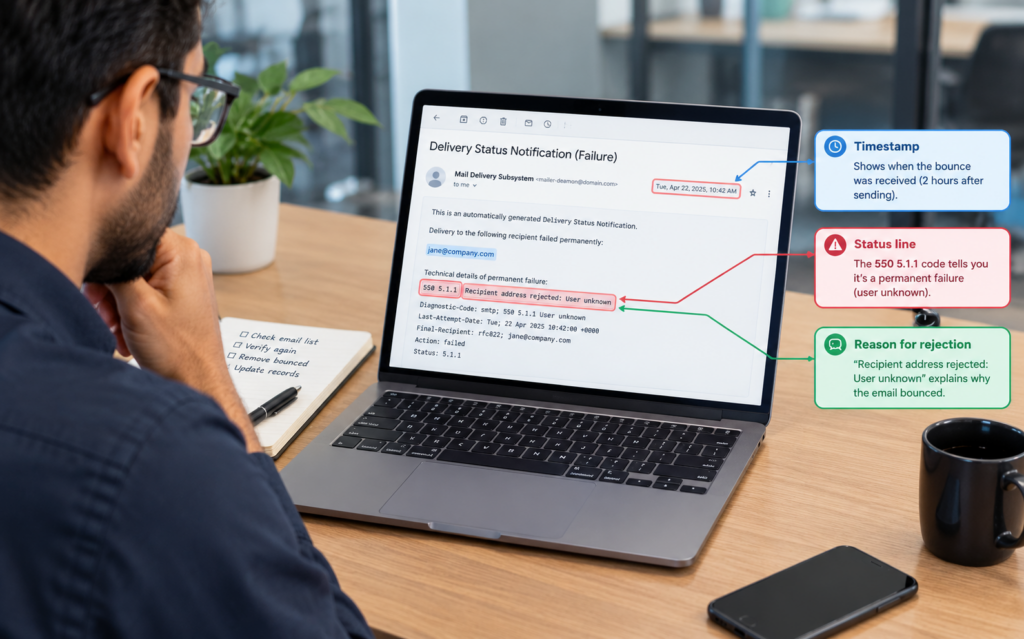
How to read the bounce message
The bounce code tells you more than the “hard” or “soft” label your platform adds. Use this table to decide whether to remove the contact.
| Bounce Code or Message | What It Means | Is the Address Dead? | What to Do |
|---|---|---|---|
| 550 5.1.1 "User unknown" or "Recipient not found" | The mailbox doesn't exist | Yes | Remove it and don't retry |
| 5.1.2 "Host not found" or "Domain does not exist" | The domain can't receive mail | Yes, for the whole domain | Check whether the company changed its domain |
| 552 or 4.2.2 "Mailbox full" | The mailbox is over its storage limit | Not yet | Retry once after a few days, then remove it if it fails again |
| 4.x.x "Try again later" or "Greylisted" | A temporary delay | No | Let your platform retry automatically |
| 5.7.x "Blocked", "Policy" or "Spam" | Your message was refused | No | Fix your sending setup and keep the contact |
| A bounce that arrives hours later from a catch-all domain | The server accepted, then rejected | Usually yes | Remove it and flag the domain as catch-all |
A seven-step routine after a bounce spike
- Export bounces with the full bounce text, not just the “hard bounce” label.
- Group them by status code: 5.1.x, 5.2.x, 5.7.x and 4.x.x.
- Group them by domain to spot company-wide changes.
- Match each bounced address against your original verification report to see whether it was valid, catch-all or unknown.
- Count the days between verification and sending.
- Remove dead addresses, fix sending problems, and re-verify any segment older than 30 days.
- Send your list provider the bounced addresses with their bounce text, and ask about replacements under their policy.
Example: one bounce spike, three different problems
This is a hypothetical example to show the process.
A software company buys 8,000 contacts from an IT Decision Makers Email List. They run the file through a verifier, see that most addresses come back valid, and launch the campaign three weeks later. The first send bounces at 6%, and their sending platform pauses the account.
When they export the bounce text, the picture changes: about half the bounces are 5.1.1 “User unknown” replies spread across many companies, which points to normal job changes. A large share comes from addresses the verifier had marked as catch-all, which the team had imported as valid. The rest are a few “mailbox full” replies and two 5.7.1 policy blocks from one strict company.
The team removes the 5.1.1 addresses, moves catch-all contacts into a separate segment for small test sends, and keeps the mailbox-full contacts for one retry. They also re-verify the remaining file before the next send, because it’s now more than a month old.
What to ask your list provider before you buy
Good data still decays, so the useful question isn’t “Is your data 100% accurate?” Instead, ask:
- When was each record last verified, and is that date included in the file?
- Are catch-all and unknown results labelled separately from valid ones?
- How were the addresses sourced?
- What’s the replacement policy for bounced addresses, and how soon after delivery must you report them?
These questions apply whether you’re buying a CEO Email List, an HR Email List, or a list built around a specific technology.
Final takeaway
A verified address that bounces a few weeks later isn’t always a sign of a bad list. Read the bounce code first. A 5.1.1 means the person or mailbox is gone, a catch-all bounce means the address was never confirmed, and a 5.7.x means your sending needs attention. Once you know which problem you have, the fix is usually simple: remove the dead addresses, separate the unconfirmed ones, and verify again close to your send date.
Frequently asked questions
1. Can an email pass verification and bounce on the same day?
Yes. A catch-all server can accept the address during verification and reject your real message later. A security filter or a temporary delay can also cause a bounce even though the mailbox exists.
2. Should I delete all catch-all email addresses?
Not automatically. Some catch-all addresses belong to real people who read their email. Keep them in a separate segment, send in small batches, and stop if the bounce rate rises.
3. How often should I re-verify a B2B email list?
Re-verify before any campaign if the last check was more than about 30 days ago. ZeroBounce estimates that at least 23% of a list decays each year, so a file can lose around 2% a month, and more after layoffs or mergers.
4. Is it the list provider's fault when verified emails bounce?
Not always. Job changes after delivery are normal, but a high share of 5.1.1 bounces on day one, or catch-all addresses labelled as valid, are fair reasons to raise the issue. Send your provider the bounced addresses with their full bounce text.
5. Do bounces hurt my sender reputation?
They can. Google’s sender guidelines tell senders to cut volume when bounces or deferrals rise and to unsubscribe recipients who bounce repeatedly. Removing dead addresses quickly protects your ability to reach the rest of your list.